Prometheus Software
Limited only by your imagination
Phoenix logo

The Phoenix Visual Form Designer allows the development of sophisticated graphical user interfaces for the PowerBASIC Windows compiler using the Windows API. With an advanced form designer that surpasses the form designer in Microsoft's Visual Basic, the interfaces you build with unparalleled speed and ease, are limited only by your imagination.

Download trial version


Why choose Phoenix?

A design environment that is unmatched by the competition

Leave your preconceived notions of a designer at the door, Phoenix takes visual form designers for the PowerBASIC Windows compiler to a new level.

  • Simultaneous editing of multiple projects. The number of projects that can be opened at a time in Phoenix is limited only by available memory. As a result, copying and pasting controls between projects is no different from copying an pasting controls within a single project.

  • Control embedding. The ability to draw controls directly or indirectly within other controls to any depth in the designer, means you can design very sophisticated interfaces without having to worry about what the final results will look like. For example, tab control design is WYSIWYG; no need to fiddle around with multiple forms.

Numerous built-in controls

  • Frame
  • Text Label
  • Image Label
  • Custom Label
  • Edit Box
  • Group Box
  • Text Button
  • Image Button
  • Custom Button
  • Check Box
  • Radio Button
  • Combo Box
  • List Box
  • Horizontal Scroll Bar
  • Vertical Scroll Bar
  • Size Box
  • Main Menu
  • Popup Menu
  • Accelerator Table
  • String List
  • Timer
  • Hot-key (window activation)
  • Hot-key Table (registered)
  • Shape (graphic)
  • Line (graphic)
  • Polygon (graphic)
  • Generic (panel and custom)
  • Placeholder (third-party)
  • OLE Container
  • Track Bar
  • UpDown
  • Progress Bar
  • Rich Edit
  • Image List
  • Tool Tips
  • Tool Bar
  • Status Bar
  • Tab Control
  • Header
  • Tree View
  • List View
  • Image and Text Combo Box
  • Rebar Control
  • Date Time Picker
  • Month Calendar
  • IP Address
  • Hot Key
  • Animation Control
  • Notify Icon Control
  • Open File Dialog
  • Save File Dialog
  • Splitter Bar
  • Menubar Control
  • Masked Edit
  • ButtonEx
  • Grid Control
  • Drive List
  • Directory List
  • File List
  • Filter List
  • Docking Control
  • Hyperlink Control
  • Button Strip Control
  • Property Box Control

A Layout manager second to none

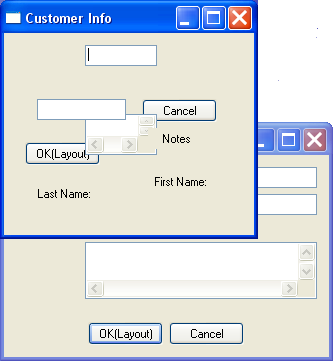
It looks simple, doesn't it?
In industry standards such as Visual Basic, this is not as simple as it seems. This simple form layout requires a maze of panels, docking and anchoring properties.
In Phoenix, it is as simple as it looks. A few clicks of the mouse in the layout editor, and you are ready to test the form. No need to compile, just drag the borders of the form or click the maximize button while in design mode.
Need to get from this
Initial window size
To this
Resized window

Support for custom control creation and packaging

When the built-in controls do not meet your needs, Phoenix makes the building, testing, packaging, and addition to its toolbox of custom controls you create a snap. The Phoenix samples include the source code for a fully functional custom control to demonstrate the process.

Easy integration of third-party controls

Third-party controls are easily integrated into Phoenix via built-in editors. Once integrated, they are no different from the built-in controls. You have access to styles, notifications, and properties at design-time and run-time, and can even subclass or superclass the controls.

Download trial version
Order Phoenix Visual Designer!

Home
Products
Screenshots
Downloads
Ordering
Support
Forums
Links


Copyright © 2003-2006 Prometheus Software | Contact Us | Recommend to a friend 

PowerBASIC is a Trademark of PowerBASIC, Inc.
All other Trademarks mentioned on this web site are the property of their respective owners.
Prometheus Software is not affiliated with PowerBASIC, Inc.